
If your calendar isn't syncing properly, here are common issues and solutions.
Events Not Showing Up
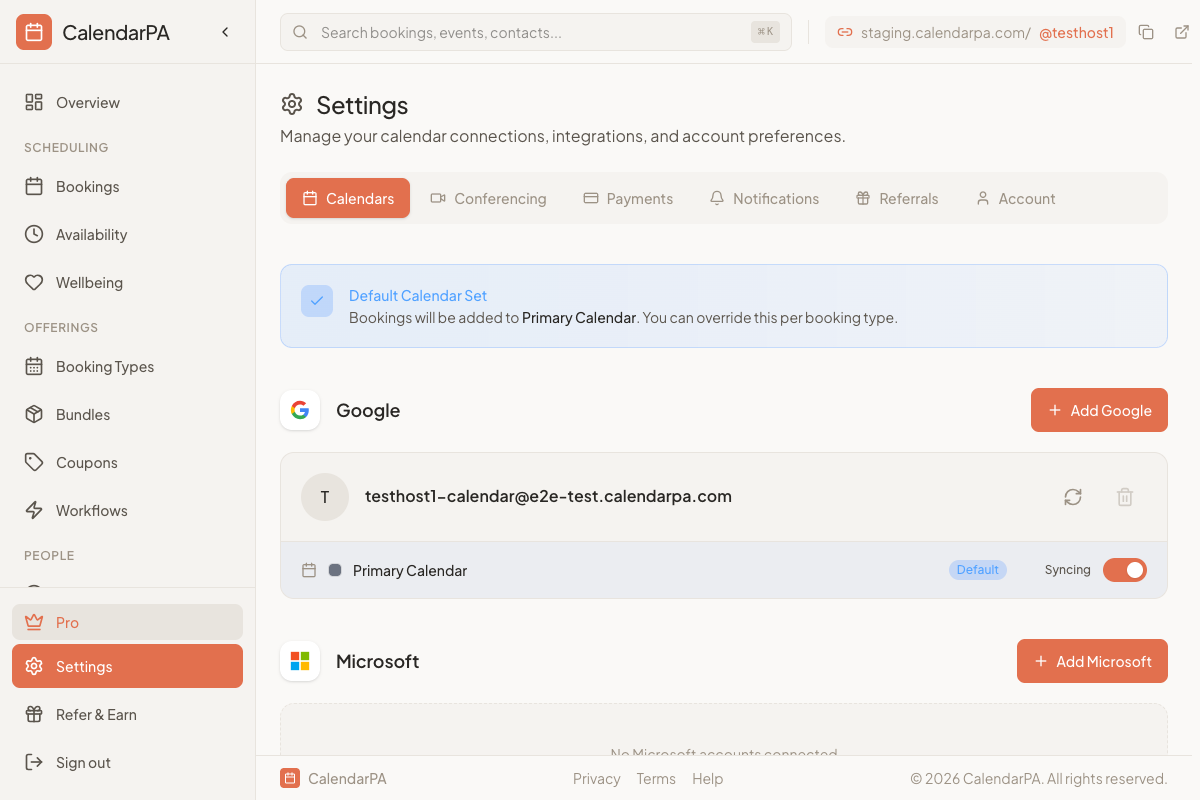
Check calendar permissions:
Go to Settings > Calendars
Click the refresh icon next to your calendar
If prompted, re-authorize access
Verify the correct calendar is selected:
Some accounts have multiple calendars (primary, holidays, shared)
Ensure you've selected the calendar you want to sync
Availability Showing Incorrectly
Events showing as busy when they should be free:
Check the event's "Show as" status in your calendar app
Events marked as "Busy" or "Out of Office" block availability
All-day events typically block availability unless marked as "Free"
Availability not updating after adding events:
CalendarPA syncs in real-time, but there can be brief delays
Click the refresh button on the Calendars page
Wait 1-2 minutes for changes to propagate
Re-connecting Your Calendar
If issues persist:
Disconnect the calendar from Settings
Wait 30 seconds
Reconnect using the same account
Re-authorize all requested permissions